
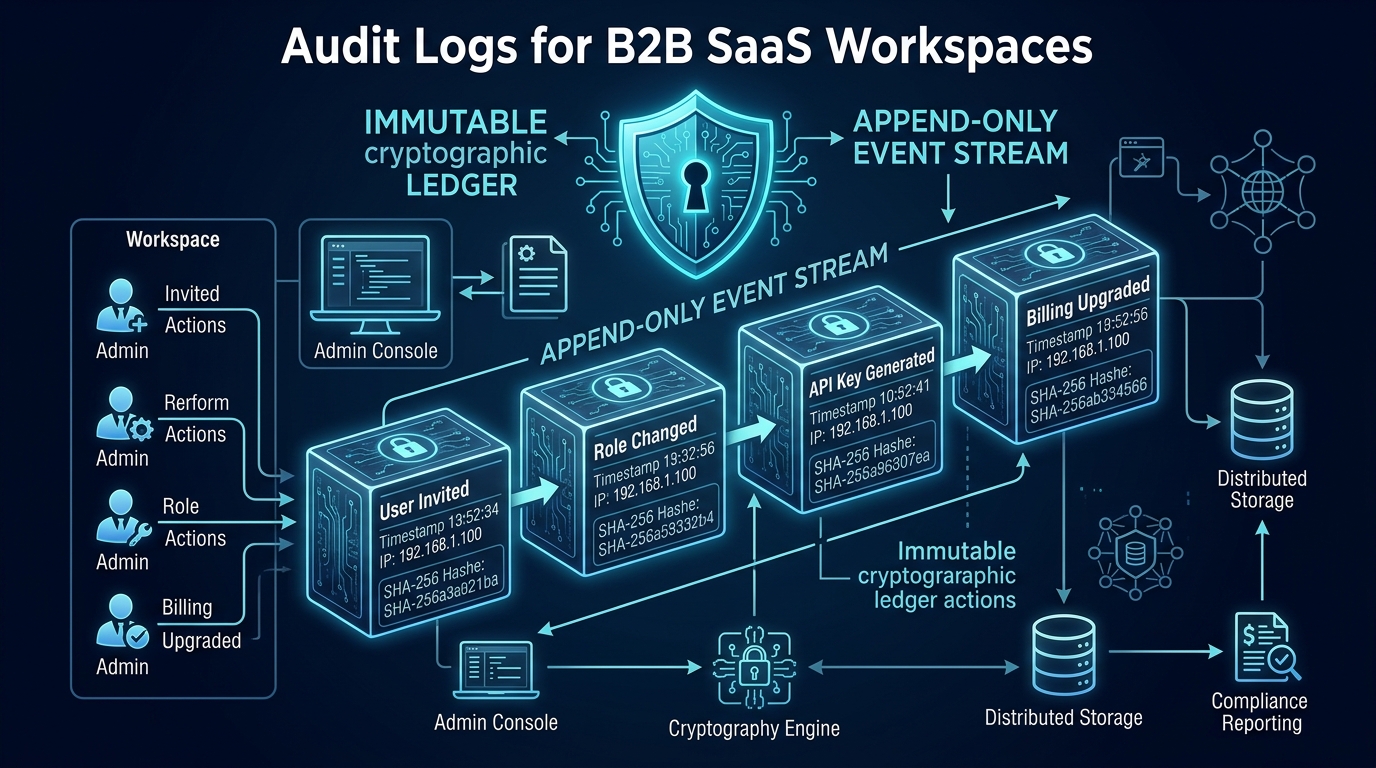
SaaS audit logs provide a durable account of important actions in a customer's workspace. They should help answer concrete questions: who changed a member's role, who exported a report, and when an approval was withdrawn. Designing that account requires more than adding a timestamped activity feed.
Choose the actions you need to explain, define the evidence each action requires, and decide how that evidence will survive ordinary edits and failures. An audit feature is a product capability with its own permissions, storage rules, and operational responsibilities.
Define the questions before the event list
Start with customers' investigation needs. A procurement team may care about changes to approval thresholds. An agency portal may need to explain who downloaded client files. Your support team may need to reconstruct an operator's intervention without exposing private internal notes to customers.
Separate business actions from diagnostic noise. A page view might belong in analytics. A failed database connection belongs in operational monitoring. A role change or sensitive export often deserves an audit record because it changes access or produces an important business effect.
Create an event inventory with an owner for each action. Include successful changes, relevant denied actions, and administrative interventions where needed. Be clear about the meaning of each record so a failed attempt cannot be mistaken for a completed change.
Give each record enough context
A practical audit event includes its own identifier, workspace identifier, event time, actor type and identifier, action, target type and identifier, and outcome. A request or job correlation identifier can connect the action to operational evidence. A schema version helps future readers interpret events after the application evolves.
Record actors explicitly. A workspace member, scheduled job, integration credential, and support operator are different sources of action. If an operator acts on behalf of a customer, preserve both identities and the authorized reason instead of pretending the customer performed the action directly.
For changes, record a deliberate summary of relevant before and after values. Do not automatically copy entire rows. OWASP's logging guidance identifies access tokens, passwords, connection strings, and sensitive personal data as information that generally should not be logged directly. Audit records deserve the same careful data selection.
Capture events with the business change
Consider what happens if a role update succeeds but the audit insert fails. The system now has a security-relevant change without the evidence expected by the customer. For changes in one database, write the business update and its local audit record in the same transaction when that matches your reliability requirements.
If events are delivered to a separate destination, a durable local record or outbox can support later delivery. Record delivery state and make repeated processing safe. A network request issued after the application responds is a fragile place to entrust the only audit evidence.
Choose failure behavior deliberately. For a sensitive permission change, refusing the change when durable audit capture fails may be appropriate. A routine notification should not necessarily block because an external audit destination is slow. Document these choices by event category rather than applying one accidental rule everywhere.
Make a role change explainable
Suppose a hypothetical consulting portal lets workspace owners promote a member to administrator. The event records the owner who requested the change, the member affected, the previous role, the new role, the workspace, and whether the change completed. The member's email address need not be copied into every record if a stable identifier meets the investigation need.
Later, that member is removed. The audit trail should remain interpretable without relying on a live membership row that no longer exists. You may retain a minimal historical display label under your retention policy or present a deleted-member identifier. Choose the approach intentionally.
If a support operator reverses the promotion, create another event. Do not edit the original to make the history look as though the first change never happened. Corrections should be explainable as subsequent actions with their own actor and reason.
Protect both reading and writing
Audit access can expose business relationships and operational history. Require workspace authorization for browsing, filtering, and exporting. Apply permissions to the underlying queries, not just to the navigation item. An export endpoint deserves the same boundary as the on-screen explorer.
Limit which application components can write or modify audit records. An append-oriented design reduces ordinary editing risk, but a database administrator may still be able to alter records. Avoid describing the system as tamper-proof unless you have implemented and verified the stronger controls required for that claim.
Decide who can view internal operator details. Customers may need to see that support accessed their workspace while internal incident notes remain separately controlled. A single unrestricted table view often mixes audiences that need different levels of detail.
Build the explorer around investigation
Useful filters include time range, actor, action, target, and outcome. Present a readable summary with structured details available when needed. Maintain stable pagination and predictable ordering so investigators can follow a sequence without records apparently moving between pages.
Exports need clear scope and generation time. If an export is asynchronous, recheck the requesting user's current access before making the file available. Store the file under the same tenant isolation rules as other customer data.
Set retention based on actual customer requirements and operational decisions. Storage cost, deletion obligations, contractual promises, and investigation needs can pull in different directions; resolve them before advertising a universal retention period.
Evaluate the complete capability
Test event capture, denied access, removed users, retries, failed writes, and export isolation. A polished explorer cannot compensate for missing underlying events, and comprehensive events are difficult to use without a workable investigation interface.
Agentium Start marks its activity and audit explorer as partial in the capability catalog. Review that scope, identify your customers' audit questions, and complete the capture and access rules those questions require before making audit commitments.
Authority References & Sources: