
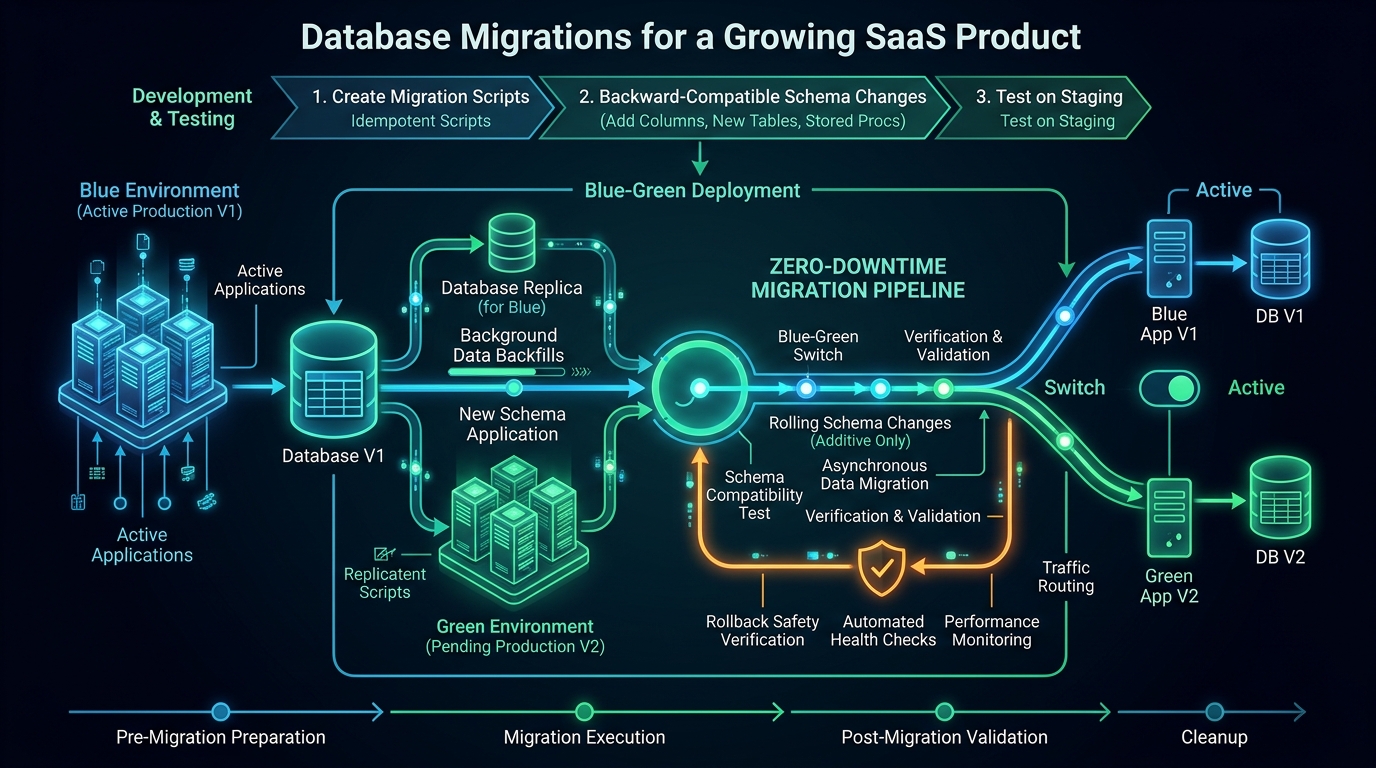
Database migrations should move a SaaS product from one valid operating state to another while preserving the meaning of customer data. A schema change that works on an empty development database can still fail on existing records, conflict with running workers, or make an application rollback impossible.
Plan migrations as part of the release design. Identify the old and new data models, the code versions that may run simultaneously, the work required to transform existing records, and the evidence that will show the transition succeeded.
Separate schema changes from data changes
A schema migration changes structures such as tables, columns, indexes, or constraints. A data migration transforms existing records. Many product changes require both, but their operating characteristics differ. Adding a nullable column is different from updating every historical record to populate it.
Review generated database operations before applying them. An ORM can generate useful migration artifacts, but the product team still needs to understand their effect on existing data and query behavior. Names that look similar in a schema editor may represent a destructive replacement rather than a preserved rename.
Use the migration workflow appropriate to the ORM version installed in your project. Prisma's migration documentation explains reviewing and applying planned changes. Commands and migration structures can change across versions, so the project's pinned dependencies and corresponding documentation should govern execution.
Design for overlapping application versions
Deployments do not always replace every running process at once. An older worker may finish a job after new web instances start serving requests. A user may submit a form opened before the deployment. Plan the transition so these normal overlaps remain understandable.
A useful pattern is to expand the schema, move behavior gradually, verify the transition, and remove the obsolete structure later. Add the new field in a form old code can tolerate. Introduce code that writes the required data. Backfill historical records. Switch reads when the new representation is ready.
Removal belongs in a later step after old readers and writers have stopped. This can require more than one release, but it creates room to observe and recover. The exact sequence depends on the feature; dual writes are a tool with consistency costs, not a default requirement for every column addition.
Work through a workspace ownership change
Consider a hypothetical service that initially stores a single owner directly on each workspace. It now needs a membership model that supports multiple authorized administrators. Replacing the owner field immediately would leave historical workspaces without the records the new authorization code expects.
First create the new membership structure and define how each current owner maps into it. Deploy code that can interpret the transition safely. Run a backfill that creates the expected membership for each existing workspace and records progress. Verify that no workspace has lost its required administrative access.
Then move the relevant reads and writes to the new model. Confirm the old owner field is no longer used by background jobs, support tools, exports, or account deletion. Only after that evidence exists should a later migration remove the obsolete field.
The important validation is about business meaning. A matching row count is helpful, but it does not prove that every membership references the right workspace or has the intended permission. Check the relationships your authorization logic will rely on.
Make backfills resumable and observable
A large update should have a clear progress model. Process a bounded group of records, record the result, and continue from a stable checkpoint. Decide how to handle invalid historical data separately from temporary infrastructure failures.
Make retries safe. If a batch runs twice after a worker restart, it should not create duplicate memberships or increment a business balance again. Use stable identities and database constraints where appropriate. Record failures with enough context to repair them without exposing sensitive row contents in general logs.
Choose batch size and scheduling from measurements in a representative environment. Smaller batches can reduce the duration of individual operations, but they also create overhead. Avoid promising that any one technique eliminates locking or performance risk for every database change.
Validate the operating effect
Test the migration against realistic shapes of data: empty workspaces, large workspaces, unusual historical values, removed users, and records created by older releases. Use synthetic or appropriately protected datasets rather than casually copying production data to a laptop.
Measure the queries affected by new relationships and indexes. A migration can preserve correctness while making an important dashboard expensive. Check how application code selects and filters data after the change, including tenant conditions and pagination.
After applying the migration, verify both database state and user workflows. Check for failed jobs, unexpected error categories, and records that remain unprocessed. The deployment is incomplete if the schema is updated but the data transition has silently stalled.
Plan recovery before removing data
Distinguish application rollback, a forward repair, and database restoration. Rolling back code does not recreate a dropped column's contents. Restoring a backup may also discard valid writes made after that backup, so it requires an explicit recovery decision.
Define the stop conditions for a migration. Examples include a failed integrity check, unexpected volume of invalid records, or unacceptable impact on a paid workflow. Know which changes can be paused, which can be retried, and which require specialist database intervention.
Practice restoration into a separate environment and verify that the recovered application can perform representative tasks. A backup file's existence does not demonstrate the complete recovery path, including credentials, storage objects, and external integration state.
Keep the migration record with the product
Store reviewed migration artifacts alongside the application release and document the required sequence. Include verification queries or procedures, backfill ownership, and the planned cleanup release. This turns a one-time operation into a process another engineer can understand.
If you are building on Agentium Start, treat every extension to its data model as a product change with compatibility and recovery requirements. A source foundation can organize the starting point; careful migration design protects the customer records you add to it.
Authority References & Sources: