
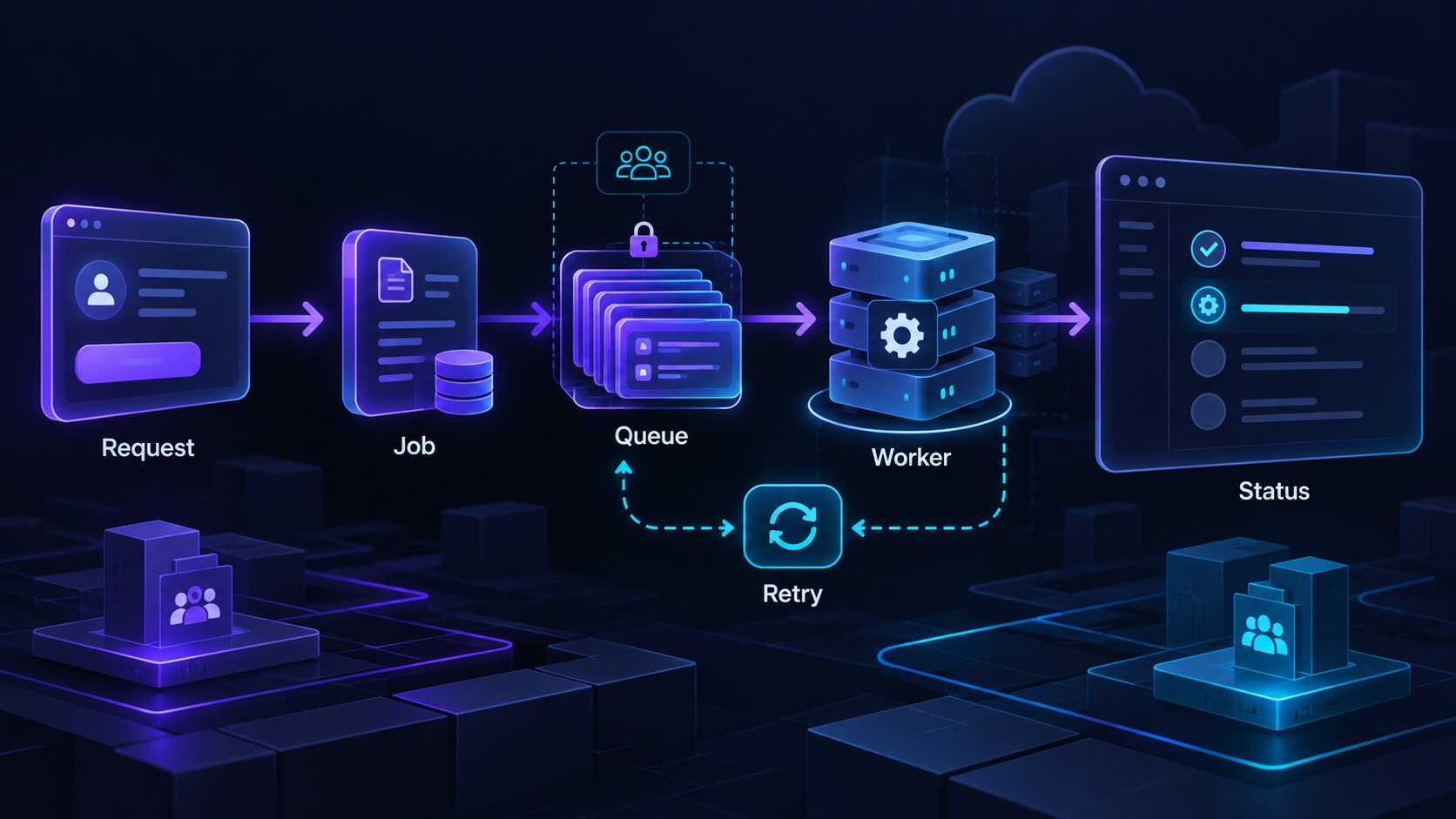
A SaaS application needs background jobs when work should continue independently of the browser request, requires controlled retries or must happen at a scheduled time. Examples include generating a large report, processing an uploaded file, sending a batch of reminders and synchronizing an external system.
Moving work into a job does not remove its complexity. It changes where the complexity is handled. The application still needs a durable record of the request, consistent tenant scope, clear progress states and a way to recover when processing fails.
Identify the work that should leave the request
Consider a hypothetical product catalog service that imports supplier spreadsheets. A small validation request may complete while the user waits. Importing a large catalog can involve file parsing, row checks, external lookups and many database changes.
The import should not depend on the customer keeping one browser tab open. A background workflow can accept the request, record a job and let the user return to an import-status page later.
Use background work when it improves the product's failure and waiting behavior. A straightforward database update may be easier to keep synchronous. Adding a queue to every operation can create unnecessary delay and more states to explain.
Ask what happens if the operation takes longer than expected, if the provider is unavailable and if the client retries after losing its connection. Those answers often reveal whether a job boundary is useful.
Store the job before promising progress
When the catalog service accepts an import, create a durable record with the workspace, source file, requesting user and initial status. Return an identifier the customer can use to find the result.
The application should only say queued after work has been preserved in a way it can recover. Starting an untracked task in the web process and returning success leaves an unclear outcome if that process stops.
Coordinate the business record with dispatch. If creating the import and publishing its job are separate operations, plan how to repair the case where one succeeds and the other fails. A durable outbox is one possible approach.
Keep the job payload focused on stable references. Large snapshots of customer records can become stale and increase the amount of sensitive data moved through operational systems.
Carry workspace context explicitly
A worker has no reliable concept of the user's currently selected browser workspace. It must receive or resolve the correct tenant context from the job record.
Before processing, verify that the referenced file and import belong to the same workspace. Use the established domain operations for writing catalog entries rather than bypassing tenant checks because the code runs internally.
Decide how changes during waiting affect execution. If the workspace is closed, the file deleted or the requester removed, should processing stop? The policy may differ for continuing an authorized import and delivering sensitive results to a former member.
For the supplier spreadsheet, an import can belong to the workspace's business workflow while notification delivery still depends on a valid recipient. Separate those decisions so a personnel change does not produce an accidental outcome.
Break the workflow into recoverable stages
An import might validate the file, inspect rows, apply accepted changes and produce an error report. These stages have different costs and failure behavior.
Inngest's error-handling documentation describes retrying failed steps and reusing completed step results. That behavior supports a workflow where a temporary failure late in processing does not require repeating every earlier stage.
Choose stage boundaries around meaningful work and manageable recovery. One enormous stage can make a retry expensive. Thousands of tiny stages can make the workflow difficult to understand.
Decide how partial success appears. An import that accepts valid rows and rejects others should say completed with issues, with a clear report. It should not alternate unpredictably between success and failure depending on which screen reads it.
Make side effects safe to repeat
Retries can repeat database writes, provider calls and messages. Give operations stable business identifiers and enforce the intended uniqueness where the effect occurs.
Inngest's idempotency guide distinguishes preventing duplicate runs from protecting external side effects. A provider call can succeed before the workflow records its result, leaving a retry boundary to handle.
For the catalog import, a row's durable identity might combine the import and source-row reference. Reprocessing that row should update or return the existing result according to policy, not create another product blindly.
Do not reuse one identifier for genuinely new work. Importing a revised supplier catalog is a new business occurrence even if it uses the same filename. Choose identifiers that match the operation's meaning.
Bound retries and expose final failures
Temporary connection failures and invalid customer data need different responses. Another attempt may solve the first; it will not repair a missing required column.
Classify failures into retryable, customer-correctable and operator-investigation categories. Use retry timing appropriate to the external dependency, and stop when another attempt cannot improve the result.
A final failure needs an owner. Show the customer what happened in useful terms and expose technical context to operators. Preserve the job identifier, workspace, failing stage and safe error details.
Provide a controlled retry or resume action after the cause is fixed. The action should use the same durable workflow rules rather than create an untracked manual process.
Design the waiting experience
Customers need to know whether work is queued, processing, completed, completed with issues or failed. Show progress only when the underlying measurement is meaningful.
For a spreadsheet import, rows processed can be useful once the total is known. A fabricated percentage that stalls near completion provides less clarity than naming the current stage.
Let users leave the page and return. Link results to the original request and make duplicate clicks return the current job when appropriate.
Compare the Agentium Start feature list with the workflow you need. Its Inngest monitor is marked partial, so include operational visibility in your implementation plan. A background job is complete as a product feature when customers and operators can understand its outcome.
Authority References & Sources: