
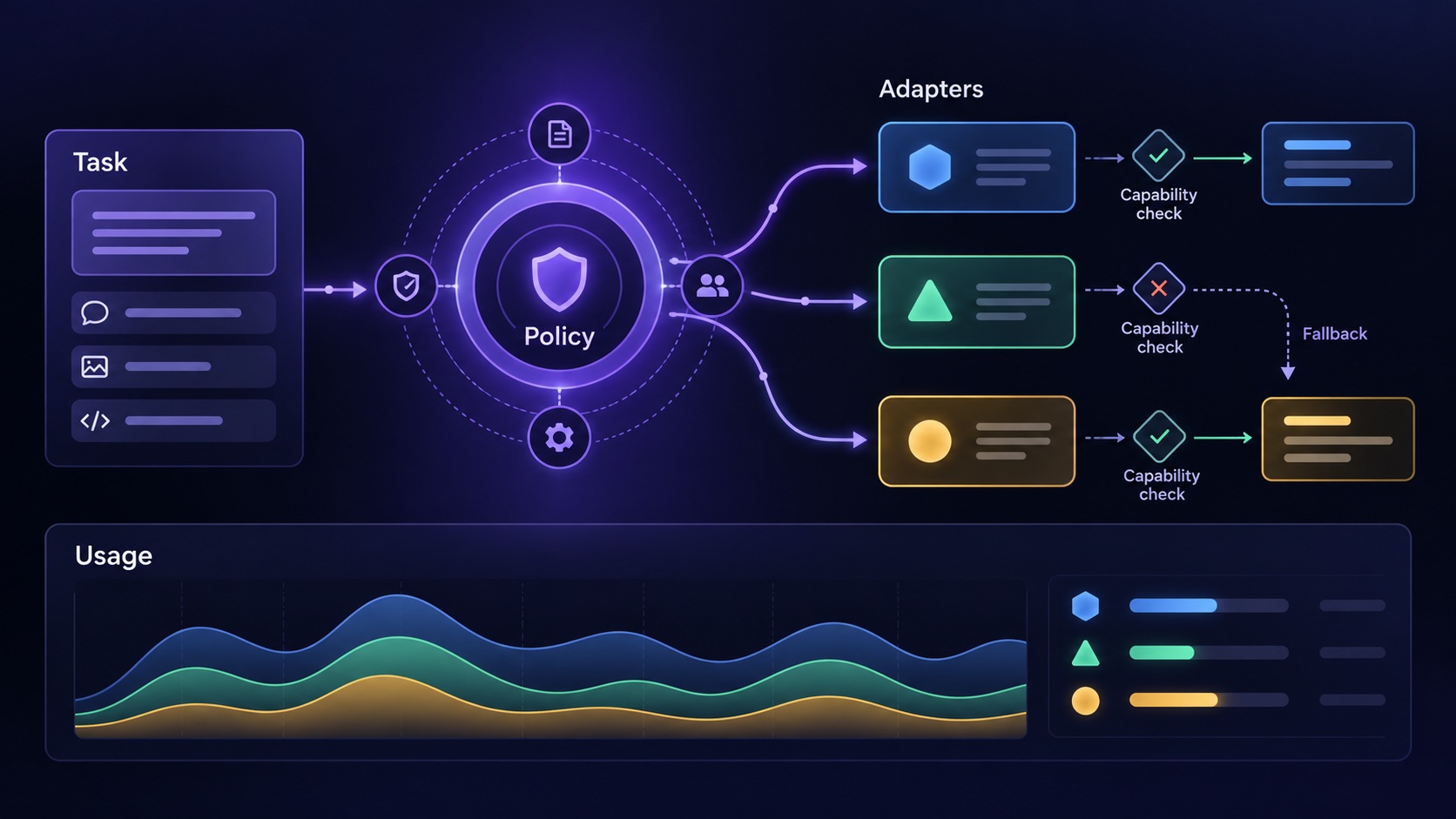
Add multiple AI providers by defining the task your application needs and implementing a tested adapter for each provider. Keep customer authorization, budgets, business rules, and result validation in your application. A common request shape can simplify integration, but it does not prove that two models behave equivalently.
Begin with a specific reason for the second provider. It might satisfy a customer deployment requirement, provide an alternative for a tested workload, or support a capability your existing integration lacks. That reason should determine what you abstract.
Define a task-oriented contract
Suppose a hypothetical SaaS extracts required response items from procurement documents. The application wants a structured list containing each requirement, its source location, and whether human review is needed.
Define that operation in your application language. Specify supported input types, maximum sizes, required output fields, allowed uncertainty, and expected failure categories. The contract should describe the result your product promises.
Avoid beginning with a universal interface for every model capability. If your initial feature only extracts structured information from text, you do not need to solve real-time audio, image generation, and autonomous tool execution simultaneously. A focused contract is easier to verify and evolve.
Keep shared policy above provider adapters
Before selecting a provider, establish the workspace, permissions, subscription access, input restrictions, and available budget. Assemble only the context the user is authorized to use.
The adapter translates that approved request into provider-specific instructions and returns the result with useful execution metadata. It should not bypass application rules when the preferred provider fails.
For teams starting from Agentium Start's B2B foundation, the customer and billing structure can support this application layer. The provider adapters, AI request lifecycle, and evaluation behavior still need their own implementation. Keep that boundary clear so model changes do not become hidden changes to customer access.
Represent capability differences explicitly
Maintain a small capability description for each supported integration. Include the input formats you have tested, structured-output support, streaming behavior, tool capabilities where relevant, and product-approved request limits.
Google's structured-output documentation demonstrates requesting output according to a schema. This is a useful provider capability to evaluate. Your application must still decide whether the returned field values satisfy the business task; a correctly shaped response can contain an unsupported interpretation.
Preserve native details that matter to debugging. A normalized result can expose common fields while retaining provider identifiers, finish reasons, usage data, and error information. Hiding every difference behind one generic string makes unexpected behavior harder to investigate.
Implement fallback as a product decision
Write down which failures permit fallback and what conditions the alternative must satisfy. A transient availability failure may justify another attempt. An invalid document, forbidden action, or unsupported input should usually lead to a clear application response.
Check whether the alternative provider is approved for the customer's data and task. Do not assume a backup integration may receive all data simply because it exists. Reapply the budget and capability checks before sending another request.
If a provider request might trigger an external action, a timeout requires particular care. The first attempt may already have performed work. Maintain application-level operation identifiers and deduplication for actions you control, and reconcile uncertain outcomes before repeating them. Generating another draft is different from sending a second customer notification.
Plan capacity for each integration
Rate limits and capacity vary across accounts, features, and providers. Google's Gemini rate-limit documentation states that limits depend on factors including usage tier and that specified limits do not guarantee actual capacity.
Build provider-specific queues or concurrency controls where the workload requires them. Honor recoverable errors with bounded backoff, and stop repeatedly calling an integration that is persistently failing.
Do not assume the secondary provider has capacity for the entire primary workload. Model a reduced-service state, such as delaying background extraction while keeping already completed results available. Tell customers what is happening through the product's ordinary status interface.
Evaluate behavior before routing real work
For the procurement example, prepare a hypothetical evaluation set containing ordinary requirements, duplicate clauses, missing page references, tables, and ambiguous obligations. Define the expected behavior without requiring a single exact wording.
Run both adapters through the same task-level checks. Inspect whether source references point to the input, whether important requirements are omitted, and whether uncertainty is flagged appropriately. Review the cases where the providers disagree.
Also test the surrounding system: cancellation, partial streaming, timeouts, malformed output, missing usage fields, and retries. A quality comparison alone does not tell you whether the provider integrates safely into your application's lifecycle.
Keep the baseline version and configuration recorded. A provider change should produce an evidence-backed decision about quality, operating behavior, and cost for your workload.
Roll out with a reversible routing policy
Enable the second provider for a controlled set of supported operations after evaluation. Record which provider handled each attempt, why it was selected, and whether fallback occurred.
Monitor results by workflow and customer requirements rather than comparing only a global average. A provider may work well for short English documents while needing more review for tables or another language.
Retain a clear way to stop new routing to an integration and handle work already in progress. Update the supported-capability record when an evaluation or provider change alters what your product can safely promise.
Review Agentium Start's feature scope when planning the underlying SaaS application. Add provider flexibility as a small, tested part of that application, with the customer's task and permissions controlling every route.
Authority References & Sources:
Related guides
For the surrounding application policy, review AI usage budgets and reviewing an AI-generated SaaS feature.