If you find yourself frequently overwhelmed by 40+ browser tabs, you've almost certainly tried a tab manager. The Chrome Web Store and Firefox Add-ons repository are packed with hundreds of tab utilities, but most fall into the same trap: they solve the memory problem by creating an organization problem.
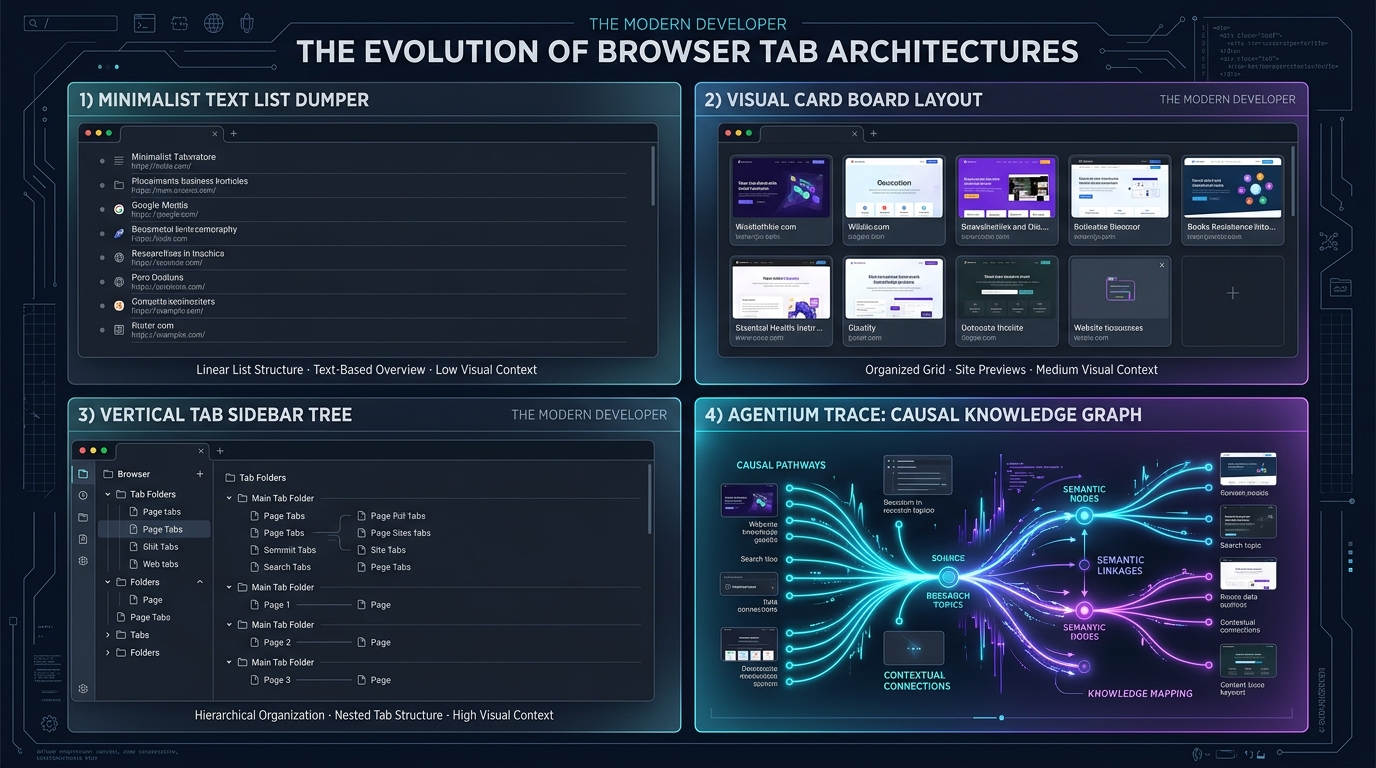
Today, four distinct philosophies dominate the tab management space:
- The Panic Dumper (OneTab): Collapse everything into a text list with one click.
- The Visual Bookmark Board (Toby): Organize tabs into curated visual Kanban cards on every new tab.
- The Firefox Powerhouse (Sidebery): Advanced vertical tab trees with container integration.
- The Causality Mind Mapper (Agentium Trace): Real-time parent-child trees in the side panel that expand into an interactive 2D research canvas.
Which one actually supports deep, uninterrupted work? Let’s put them head-to-head.
The Feature Matrix
| Feature | OneTab | Toby | Sidebery | Agentium Trace |
|---|---|---|---|---|
| Browsers | Chrome, Firefox | Chrome, Edge, Firefox | Firefox only | Chrome, Firefox, Edge |
| Tab Tracking | Manual dump on click | Manual drag into lists | Real-time automated | Real-time automated |
| Hierarchy | Flat list | Columns / Cards | Nested tree | Nested tree & 2D Graph |
| Side Panel Integration | ❌ Full-page tab only | ❌ New Tab takeover | Native Sidebar | Native Side Panel / Sidebar |
| Note & Quote Pinning | ❌ | ❌ | ❌ | ✅ Alt+S / Right-click |
| Memory Hibernation | Hard close (kills tabs) | Hard close | Native tab unloading | Visual branch hibernation |
| PKM / Dossier Export | Raw text list | JSON | JSON | Markdown, Obsidian Canvas, NotebookLM |
| Privacy Architecture | Local | Cloud account required | Local | Local-first (IndexedDB) |
1. OneTab: The Emergency Nuclear Option
OneTab is the classic tab manager. When your browser is lagging and your fan is screaming, you click the funnel icon, and every tab in the current window collapses into a single list of blue links.
The Good:
- Instantly frees 95% of browser RAM.
- Extremely lightweight with zero learning curve.
- Fully local storage.
The Bad:
- A link graveyard: Once collapsed, tabs lose all relationship to one another. There is no search, no hierarchy, and no context explaining why you opened each page.
- Accidental data loss: If your local browser cache corrupts or resets, recovering your OneTab list can be excruciating.
- Doesn't help you while browsing: OneTab only acts after you've accumulated a disaster.
2. Toby: Beautiful Bookmarks for Daily Workspaces
Toby replaces your new tab page with a clean, visual dashboard where you can organize tabs into curated collections and columns.
The Good:
- Visually attractive card layout with rich previews.
- Great for saving static sets of tabs (e.g., "Morning Routines", "DevOps Dashboards").
- Cloud sync lets teams share collections.
The Bad:
- High organizational friction: You must manually drag tabs into collections. When doing deep, fluid research, stopping to file tabs destroys your train of thought.
- Takes over New Tab: Intrusive if you prefer minimal or custom homepages.
- Not suited for exploratory rabbit holes: Great for bookmarks you open every day; terrible for exploratory academic or technical research.
3. Sidebery: The King of Firefox Vertical Tabs
For dedicated Mozilla Firefox users, Sidebery is a gold standard. It replaces the horizontal tab strip with a vertical tree and integrates deeply with Firefox's Multi-Account Containers.
The Good:
- Blazing-fast performance and buttery-smooth animations.
- True parent-child tab nesting.
- Highly customizable panels and keyboard navigation.
The Bad:
- Firefox exclusive: Cannot be used on Google Chrome, Brave, or Microsoft Edge.
- Purely a tab strip: Lacks research-oriented tooling like quote pinning, full-screen mind maps, or export to Markdown/Obsidian.
4. Agentium Trace: The Deep Work & Research Mind Mapper
Agentium Trace (live on Chrome and Firefox) bridges the gap between vertical tab trees and personal knowledge management.
Rather than waiting for you to manually file tabs or dump them into a grave, Trace sits quietly inside your browser's Side Panel and observes the causal paths of your browsing session.
                  ┌─► Article A ──► Pinned Statistic (Alt+S)
                  │
Google Search ────┼─► Documentation B
                  │       └─► GitHub Repo C (Hibernated)
                  │
                  └─► Community Discussion D
Why Trace Stands Out for Deep Work:
- Automated Causality: Tabs opened from a link automatically indent under the source page. You always know how you got to a page.
- In-Tab Quote Pinning: Select any text, press
Alt+S, and anchor verbatim highlights directly to that page node. - RAM Pruning without Context Loss: Hibernate idle tab branches to free system memory while keeping their nodes, titles, and notes alive in your visual tree.
- Full-Screen 2D Canvas: Expand your session into an interactive node graph with layout algorithms, minimaps, and search filters.
- Obsidian & NotebookLM Exports: With one click, export your research dossiers into native Obsidian Canvas (
.canvas) files or NotebookLM source packs. - 100% Local-First Privacy: All browsing trees, notes, and session logs stay on your local device in IndexedDB.
The Verdict: Which Tool Should You Choose?
- Choose OneTab if you just need an emergency "panic button" to kill 80 tabs and save your laptop's battery once a week.
- Choose Toby if you have 10-15 static SaaS dashboards and links that you want neatly organized on your New Tab page.
- Choose Sidebery if you use Firefox exclusively and want a sleek, highly customizable vertical tab strip.
- Choose Agentium Trace if you do exploratory research, write code, conduct literature reviews, or synthesize complex web information across Chrome and Firefox, and want your tab tree to double as an intelligent, local-first research mind map.
Ready to upgrade your research workflow?