
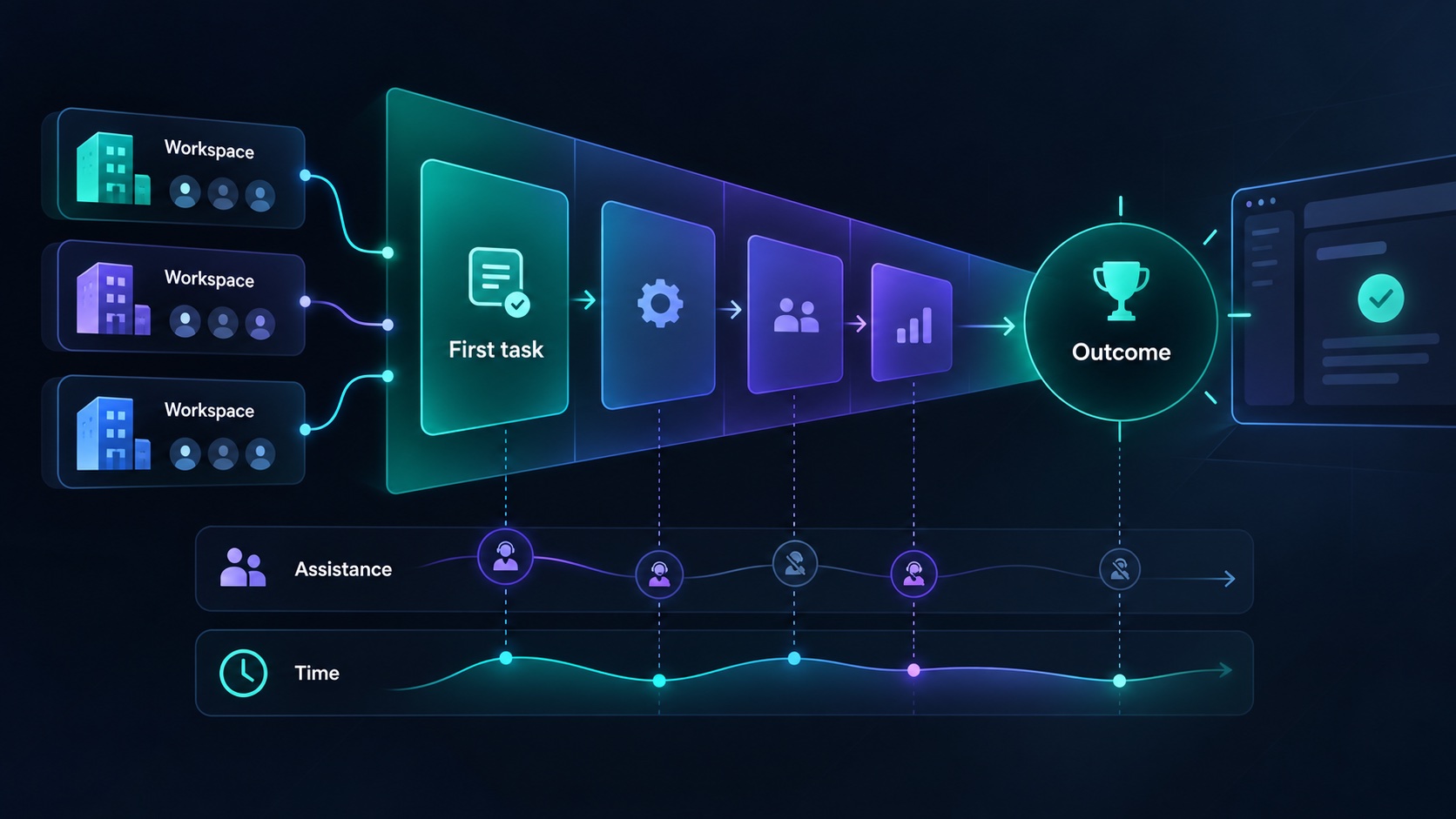
SaaS activation metrics should tell you whether a new customer has completed a meaningful part of the job they bought your product to do. Account creation, dashboard visits, and onboarding checkboxes can help explain progress, but none automatically proves value. Start with one observable outcome, then measure the steps that lead to it.
For a B2B product, that outcome often belongs to a workspace. Several people may contribute before the customer benefits. A founder who measures each person separately can mistake a healthy division of work for incomplete onboarding.
Define a result a customer would recognize
Write the activation definition in ordinary business language before choosing an analytics event. An approval tool might activate a workspace when a requester submits a real request and an authorized reviewer records a decision. A reporting product might activate when a customer connects a source, produces a valid report, and shares it with a colleague.
Distinguish a first result from a mature habit. Requiring repeated weekly use in the activation definition delays your ability to diagnose the first session. Conversely, counting a blank project as activation gives you a fast metric with weak meaning. Define the first result now and track repetition separately.
Treat the definition as a hypothesis. When customers say a different step delivered the value, investigate. Change the metric deliberately, retain its previous definition in your notes, and avoid presenting the old and new rates as a continuous comparable series.
Choose the unit and the observation window
Decide whether you are measuring people, accounts, workspaces, or paying organizations. These units answer different questions. A workspace owner can activate a team without every invited member signing in. A consultant can participate in several workspaces and should not inflate the count of paying organizations.
Use a fixed observation window suited to the workflow. An illustrative seven-day window may fit daily approvals; a monthly reporting tool may require a different window. State the denominator explicitly: eligible new workspaces created during a defined period that have had enough time to complete the window.
Exclude internal tests and clearly identified demo workspaces using a durable property. Keep exclusions consistent. Removing every unsuccessful workspace because it appears unqualified produces an attractive number while hiding a positioning or acquisition problem.
Instrument a short sequence of events
Track a small set of events with clear meanings. For an illustrative approval product, these could be workspace created, request submitted, reviewer joined, and decision recorded. Record the completion of important server-side operations after they succeed. A click on Submit can be useful diagnostic evidence, but it should not represent a successfully saved request.
Document each event's trigger, owner, workspace identifier, timestamp, and relevant non-sensitive properties. A workflow type or role category may be useful; the complete request description usually is not. Give events stable names so a button redesign does not silently change their meaning.
Analytics tools interpret funnels differently. Google Analytics documents open and closed funnels, including whether users may enter at later steps. Check those rules before assuming your chart measures the journey you intended. For a workspace journey completed by several people, verify that your chosen analysis can actually group their events at the workspace level.
Read a small sample without overclaiming
Consider a hypothetical first cohort of 20 eligible workspaces. Twelve submit a request, eight get a reviewer into the workspace, and six record a decision within seven days. Under that definition, activation is six divided by twenty, or 30 percent. These are illustrative numbers, not an industry target.
The funnel points toward investigation, but it does not establish the cause. Reviewers may not understand the invitation. The requester may have entered the wrong address. The customer may have signed up before having real work ready. Read support conversations and ask a few customers to walk through their experience.
With only 20 workspaces, a difference of one customer changes the rate by five percentage points. Report counts beside percentages and avoid treating a small movement as proof of improvement. A clear observed obstacle is often a stronger basis for an early product decision than a noisy comparison between tiny cohorts.
Measure time and assistance together
Time to value needs a defined starting point and endpoint. Record elapsed time from workspace creation to the first completed approval, then consider an additional measure from the customer's first real work session. These reveal different problems: delayed implementation versus a difficult workflow.
Track whether a founder or support person helped. A customer who activates during a guided session has reached value, but the path is different from independent activation. Label the assistance instead of excluding the customer. You can then learn which setup steps are expensive and which explanation belongs in the product.
Inspect the range of completion times as well as a summary. If most customers finish quickly but a few wait days for an invitation, the overall average can obscure the operational issue. Follow the slow cases back to the relevant event and customer context.
Turn the metric into a weekly decision
Maintain a brief review containing eligible workspaces, activated workspaces, time to first result, assisted activations, and the main unresolved obstacles. Select one change linked to a specific obstacle. For example, if customers cannot identify the reviewer role, revise that step and observe the next comparable group.
Check that events still represent real actions after a release. A new background process or automatic sample project can accidentally inflate activation. Keep retention visible alongside activation so a smoother first session does not conceal a product customers stop using.
Before adding more analytics, define the first business result your product should deliver. Use the Agentium Start capability overview to map the supporting application flows, then instrument the outcome that makes your own product useful.
Authority References & Sources: