
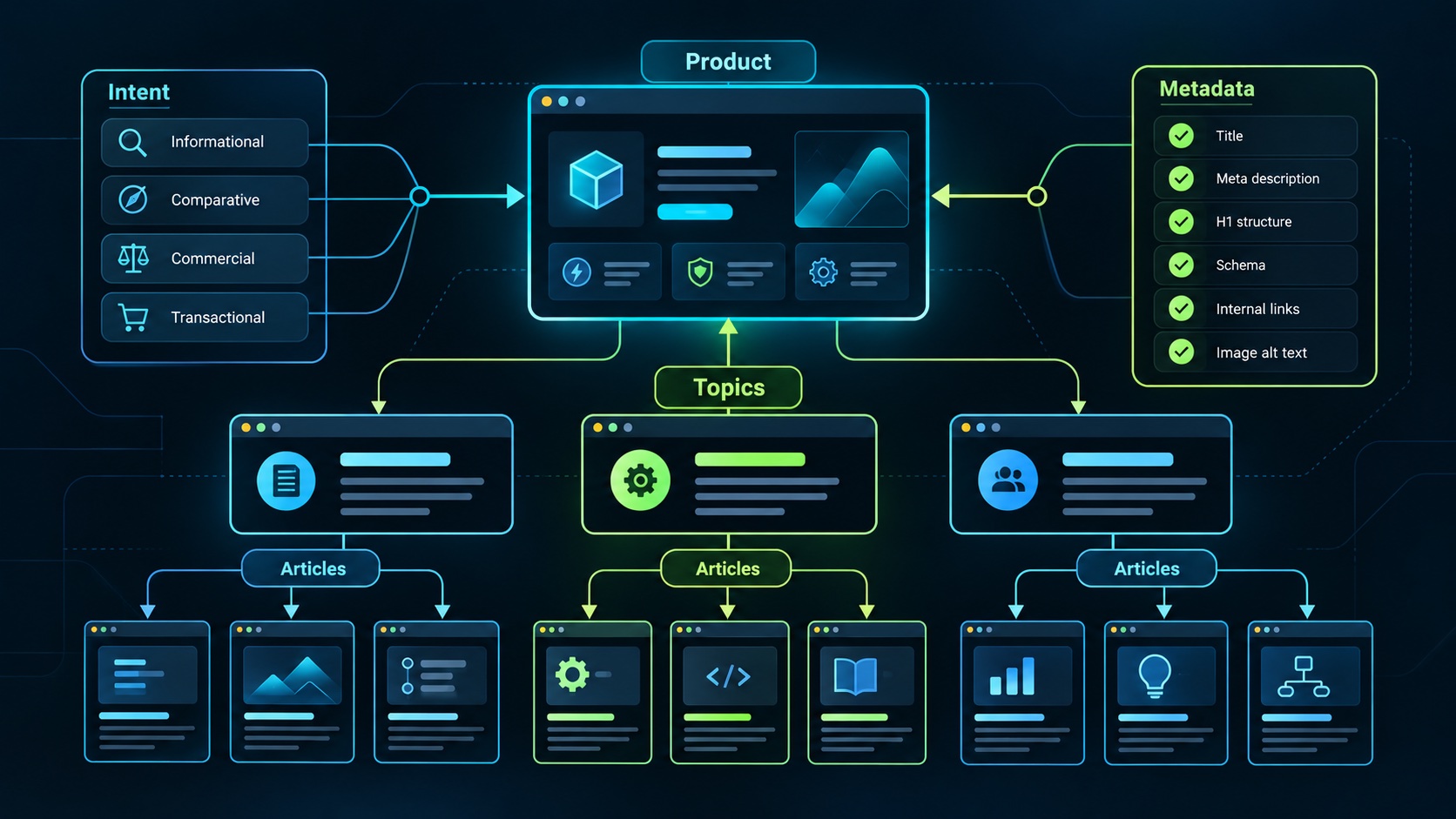
A SaaS marketing site should make it easy for a buyer to understand the product, evaluate its fit, and find answers to the problems that brought them there. SEO structure supports that journey by giving each page a clear purpose and connecting related information through useful navigation and links.
Begin with the questions your intended customers ask. A technically tidy site with interchangeable articles still leaves readers without a reason to choose or trust the product. Organize the site around decisions, workflows, and evidence you can actually provide.
Give each page a distinct job
The homepage explains who the product serves and the main result it helps them achieve. Product and feature pages explain how relevant capabilities work. Pricing explains the commercial choice. Documentation helps someone understand setup or use. Blog articles answer educational questions that deserve more depth than a sales page.
Avoid making every page compete to explain the entire product. A feature page about workspace permissions should focus on access decisions and supported behavior. An article about designing roles can teach the broader concept and point readers toward the relevant product capability when appropriate.
Use descriptive navigation that reflects these jobs. Visitors should not need to decode clever labels to find pricing, implementation scope, or documentation. The organization should remain understandable when the site grows beyond its first few pages.
Map topics to buyer intent
Create a content map containing the question, intended reader, main answer, supporting evidence, and useful next action. Distinguish someone learning a concept from someone comparing products or preparing an implementation. These readers need different levels of commercial detail.
For a hypothetical equipment maintenance SaaS, an article about inspection scheduling can explain how to choose intervals and responsibilities. A feature page can show how the product represents schedules. A pricing page can explain how the relevant plan is charged. Each page contributes something different.
Use a small number of topic groups tied to the product's actual audience. Broad traffic from unrelated topics may produce visits with little buying relevance. A coherent set of articles can help a buyer move from understanding the problem to assessing whether your approach fits.
Build paths readers can follow
An illustrative structure might use /features/inspection-schedules for a product capability and /blog/inspection-scheduling-process for an educational article. These are example paths for the hypothetical site, not requirements imposed by a search engine. Choose stable, readable paths that fit your publishing system.
Link from a broad guide to a detailed explanation when the reader reaches that question. Link from an educational article to a product page only when the feature is a relevant next step. Use anchor text that describes the destination instead of repeating a vague instruction to click here.
Google's SEO Starter Guide explains how links help discovery and provide context. Treat internal linking as part of navigation and explanation. An important article should be reachable through the site's visible structure, not exist only because its URL appears in a spreadsheet.
Make articles useful on their own
Answer the primary question early, then develop the reasoning with specific decisions, examples, and tradeoffs. A guide about choosing inspection intervals should help someone make that choice even if they do not purchase your software. The product connection becomes more credible when the explanation has independent value.
Use original examples and clearly label hypothetical numbers. Cite primary sources for technical or policy claims that need support. If you describe your product, distinguish implemented behavior from examples and planned work. Avoid invented customer stories or performance claims presented as evidence.
Google's guidance on helpful content emphasizes value for readers and explicitly rejects the idea of a preferred word count. Choose length according to the question. A complete explanation may need several sections; adding repetitive paragraphs does not make the answer more useful.
Keep titles and metadata accurate
Write a unique page title that describes the content in language the intended reader recognizes. Use one clear main heading and meaningful section headings. A promise such as a practical migration checklist should lead to an actual checklist with enough explanation to apply it.
Write a distinct meta description that summarizes the page's value. Google may generate a search snippet from page content rather than display the supplied description, as its starter guide explains. Keep both the description and the visible opening accurate rather than relying on metadata to correct an unclear article.
Give informative images appropriate alternative text and keep captions useful. If a screenshot demonstrates a product capability, show a representative state and make any sample data clear. Decorative imagery should support readability instead of displacing the explanation a search visitor came to find.
Check the published experience
Open important pages in a normal browser and confirm that navigation, headings, links, images, and forms work. Check the canonical destination you intend for duplicate or variant URLs, the pages included in your sitemap, and the indexing settings applied by the publishing system.
Keep private application data behind authentication and authorization. Search controls are about crawler behavior; they are not a substitute for protecting workspace records. Public marketing content and private customer workflows need their own appropriate boundaries.
When changing a published URL, plan the redirect and update relevant internal links. Keep the reader's path intact. An article that receives attention but leads to a broken product page loses the connection between useful content and commercial evaluation.
Measure relevance as well as visibility
Review search queries, landing pages, and qualified next actions. Search impressions can reveal whether pages are being discovered, while product-page visits, meaningful sign-ups, and customer conversations help assess audience fit. Interpret low-volume changes cautiously.
Improve existing pages when a question remains unanswered or product behavior changes. Add new articles when they satisfy a distinct need. Agentium Start includes marketing and blog foundations in its published capability scope. Use that foundation to build a site whose structure, explanations, and product evidence help the same buyer move forward.
Authority References & Sources: