
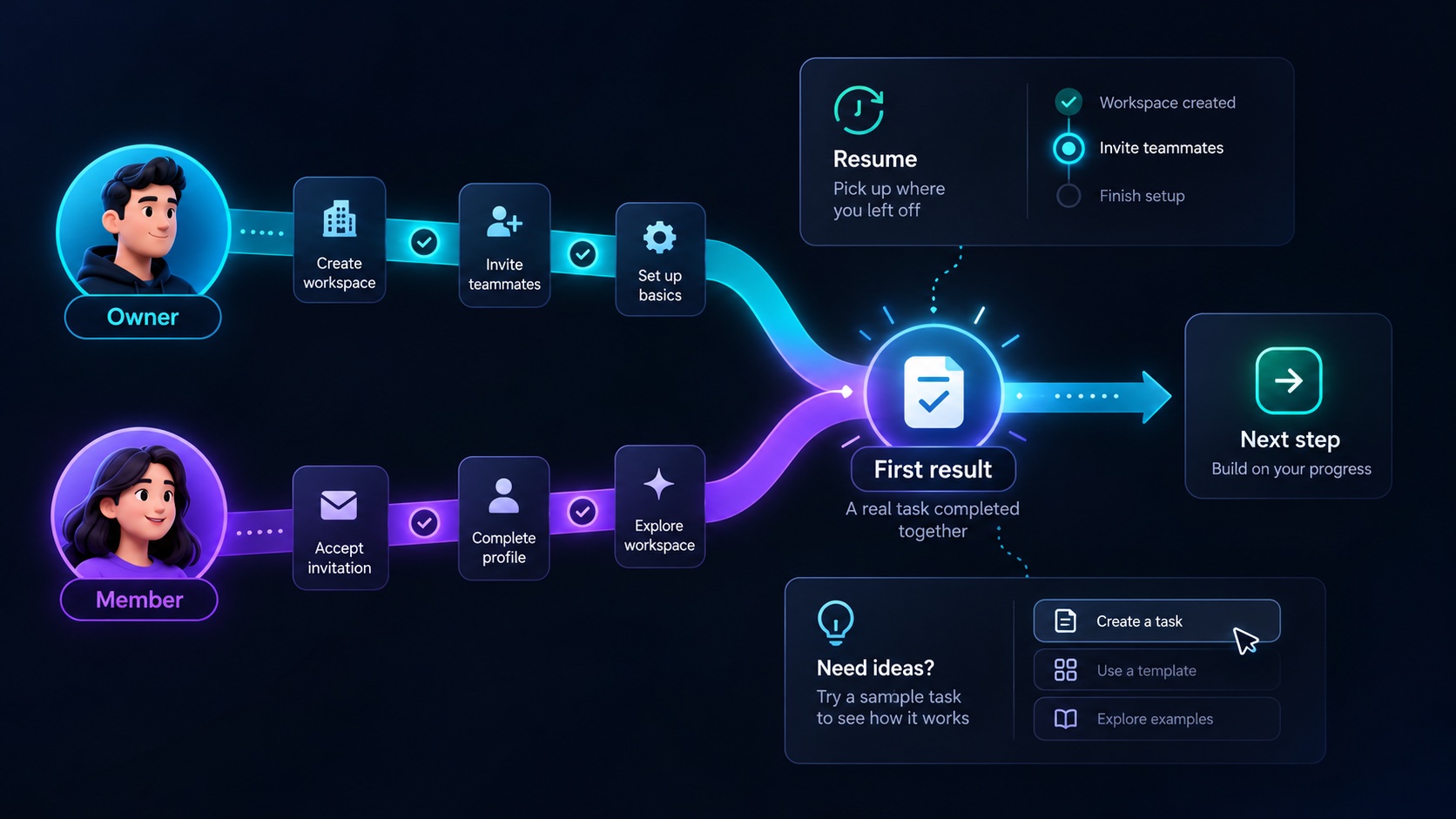
A useful SaaS onboarding flow takes a customer from an empty account to a result they recognize as valuable. Creating a workspace, completing a profile and watching a tour can support that journey, but none of them necessarily proves that the product has helped.
Define the first result in the customer's language. For a hypothetical equipment inspection application, it might be creating a real inspection, assigning it to a colleague and receiving the completed checklist. That gives onboarding a concrete destination and makes unnecessary setup easier to spot.
Choose an outcome small enough to complete
The first useful result should demonstrate the core workflow without requiring a full organizational rollout. An inspection customer should not need to import every asset, configure every location and invite the entire company before trying one inspection.
Select a manageable unit of work: one asset, one checklist and one assignment. Explain what completing it will establish. If real collaboration is central to the product, acknowledge that the final result may depend on another person rather than pretending one user can complete everything immediately.
Distinguish a practice task from real work. A sample inspection can demonstrate the interface, but it should be visibly labeled and easy to remove. The customer should understand whether a message was sent to a colleague or only simulated.
Ask for information when it becomes necessary
Every field creates a small decision. Before adding it to signup, ask which immediate operation depends on the answer.
Workspace name may be needed to identify the account. A billing address may be needed when purchasing. The customer's full asset taxonomy may be useful later, after they understand the product. Asking for all of these together makes the earliest task larger than it needs to be.
The GOV.UK question page pattern recommends knowing why each question is asked and requesting information that is actually needed. Applied to SaaS onboarding, this supports a sequence in which configuration follows the work it enables.
Clearly mark optional fields. A skip action should have a predictable consequence, such as using a default checklist, rather than leaving the user unsure whether they have broken the setup.
Give owners and invited members different journeys
A workspace owner and an invited inspector arrive with different intentions. The owner needs to create a usable team environment. The inspector may only need to complete an assigned task.
Do not send both people through workspace creation, plan selection and organization settings. Resolve whether a person is joining an existing workspace, creating a new one or returning to unfinished setup.
For the invited inspector, a good arrival page identifies the organization, explains the assignment and offers the next action. If additional information is required, explain how it supports the task.
The owner may benefit from a short setup checklist. It should describe outcomes such as assign your first inspection, rather than vague tasks such as explore the dashboard. Let completed work remain completed when the owner leaves and returns.
Make empty states carry the explanation
A blank table with a create button assumes the customer knows what belongs in it. An effective empty state explains what the section is for, what an entry represents and what will happen after the first action.
On the assets page, the inspection product could explain that an asset is the equipment being inspected, then offer to add one item or import several. On the inspections page, it could connect the next step to the asset already created.
Keep sample content separate from actual counts and customer progress. If a dashboard shows example overdue inspections, make the example state unmistakable. Otherwise, a new user may spend their first session trying to fix a problem that does not exist.
Use help text close to the decision it supports. A long introductory tour is difficult to remember when the relevant screen appears later.
Design for interrupted setup
Onboarding rarely happens in a single uninterrupted session. A customer may need information from a colleague, wait for an integration administrator or return after an import finishes.
Persist meaningful progress. If an asset was created successfully before the next step failed, show the saved asset on return. Repeating setup should not produce duplicate workspaces or send the same invitation unexpectedly.
For imports, explain whether the request is queued, processing, completed with warnings or failed. A failed import should offer a specific recovery path, such as correcting rows with missing asset names.
Also decide how a user can leave the guided flow. They may already understand the product or prefer another route. Keep onboarding available as assistance without making it an obstacle to ordinary navigation.
Measure the journey by customer work
Track events that reveal progress toward the chosen outcome. In the illustrative inspection flow, these might include asset created, inspection assigned and first checklist completed.
A useful event definition includes the workspace, the action and whether the data is real or demonstration content. Do not count repeatedly opening a page as repeatedly achieving value.
Review where customers stop and investigate the reason. A low invitation acceptance rate might reflect delayed email, unclear purpose or the fact that the owner invited someone before creating relevant work. The event count identifies the location of a problem; it does not explain the cause by itself.
Pair those observations with a small amount of direct feedback. Ask what prevented completion at the point where someone can provide a meaningful answer.
Finish with a clear next step
After the first checklist is completed, show what the customer achieved and the logical next action. That could be reviewing findings, scheduling another inspection or adding a second asset. Avoid immediately presenting every advanced feature.
Use the Agentium Start feature overview when planning the foundation for your onboarding flow. Map its available screens and components to your specific first outcome. The guided journey should reflect how your customer succeeds, with each setup step earning its place along that path.
Authority References & Sources: