
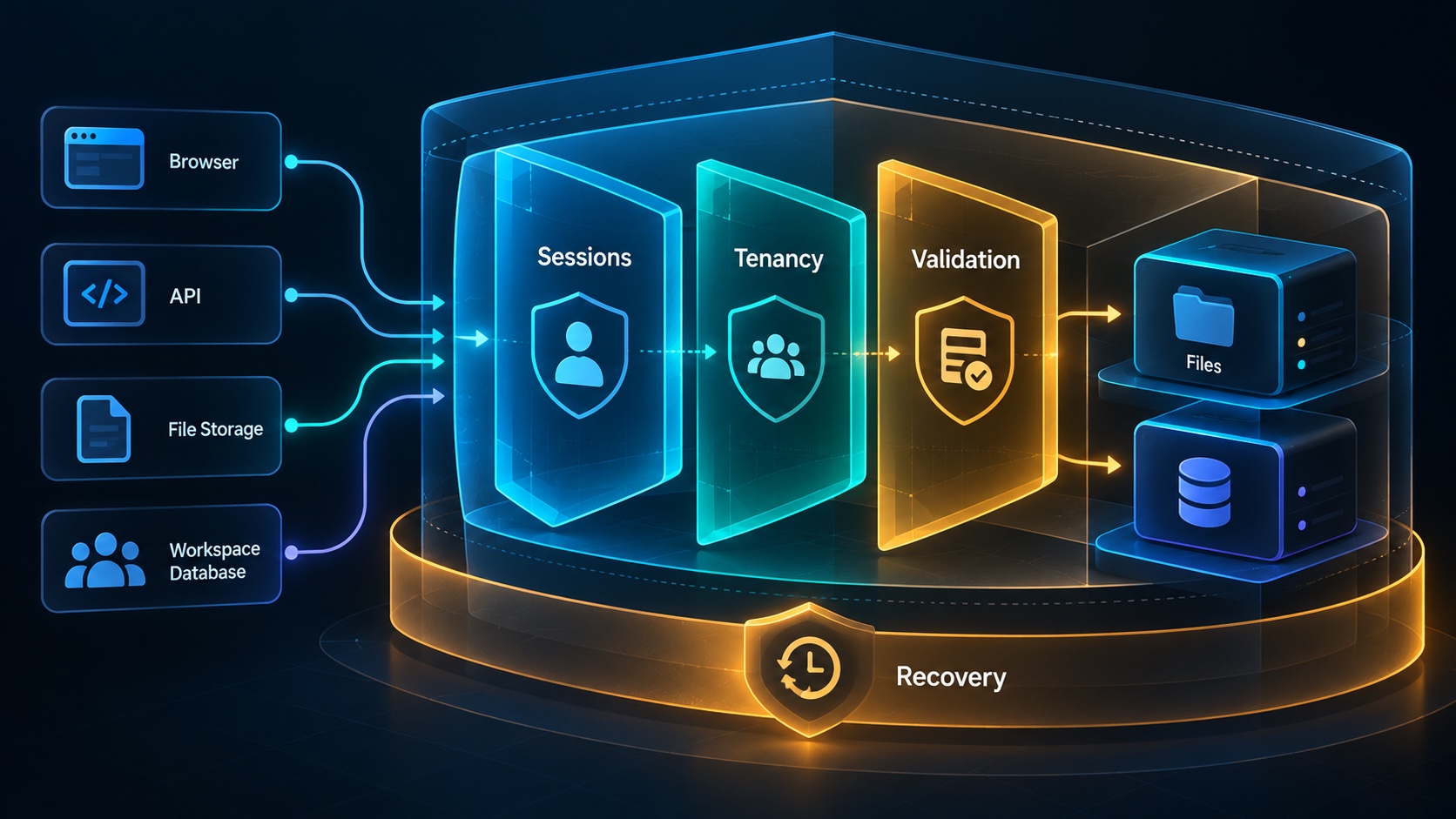
A SaaS security checklist is useful when each item maps to a real data flow and a way to verify the control. A checked box saying secure authentication provides little evidence. A demonstrated refusal to let a removed member download a private workspace export answers a specific security question.
For a small engineering team, begin with customer data, privileged actions, and public entry points. Prioritize failures that could expose one customer's information to another, grant unauthorized access, or create uncontrolled cost and operational damage.
Map data and entry points
List where customer information enters, where it is stored, who can retrieve it, and which providers receive it. Include uploads, email attachments, API requests, exports, analytics, error reports, and background jobs. A diagram or concise inventory is enough if it stays accurate.
Identify privileged operations such as role changes, billing administration, credential creation, bulk exports, and account deletion. Name the actor allowed to perform each action and the evidence the server uses to authorize it. This becomes the basis for implementation and testing.
Mark public endpoints separately from authenticated ones. Sign-in callbacks, invitation acceptance, contact forms, and webhooks may each need different validation. Treat every interface according to its actual trust boundary instead of assuming all routes share the same authentication model.
Verify account and session behavior
Check the complete sign-in flow, including callback validation, session creation, logout, and account recovery where offered. Protect authentication links and session credentials from logs and analytics. Review how long sessions remain valid and how access is revoked when an account is disabled.
Require stronger protection for the provider accounts and administrative consoles that control production. A well-designed application cannot compensate for an exposed hosting or database administrator account. Use individual access and remove it promptly when responsibilities change.
Test session behavior during meaningful changes. A workspace member who is removed should lose protected access even if an existing browser tab remains open. A role downgrade must affect direct API requests, not merely change which buttons appear after the next page refresh.
Enforce workspace boundaries everywhere
OWASP's authorization guidance recommends denying access by default and validating permissions on every request. Implement those principles around both the action and the target resource. Membership in one workspace does not authorize access to an arbitrary record identifier.
Apply tenant conditions to lists, detail reads, writes, counts, search, exports, and background processing. A protected main page can coexist with an unprotected search suggestion endpoint. Review shared helpers and secondary paths instead of checking only the most visible controller.
Test a legitimate action with the wrong workspace and with insufficient permissions. Verify that the database and provider state remain unchanged after denial. Successful rejection needs to prevent the effect as well as return an error response.
Validate input and render output safely
Validate input on the server even when the browser form performs checks. Accept only expected fields, use parameterized database access, and encode output for its rendering context; sanitize deliberately allowed rich text. For cookie-authenticated state-changing requests, apply appropriate CSRF defenses and verify the framework's coverage. OWASP's CSRF guidance explains why authentication cookies alone cannot establish request intent. Test unexpected form fields, stored text containing markup, and a forged mutation request. Each should be rejected or rendered safely without unintended side effects.
Protect files and costly operations
For uploads, define accepted types, maximum size, storage ownership, and the steps required before a file becomes available. Validate what the application actually receives rather than trusting only a filename or browser-provided content type. Choose scanning or additional processing according to the file risk and product use case.
Private retrieval should enforce the intended access policy. A signed download URL can grant temporary access to whoever possesses it, so choose its lifetime and distribution carefully. Avoid exposing private object locations through unrelated workspace records or public diagnostic responses.
Apply limits to operations that consume meaningful resources: bulk exports, message delivery, file conversion, and external API calls. Combine workspace budgets, bounded payloads, concurrency controls, and provider-side restrictions where useful. A single request-rate limit rarely captures every expensive workflow.
Walk through a document sharing threat
Imagine a hypothetical contract review SaaS. A member uploads a private contract and receives a download link. Another workspace's member obtains the file identifier from a copied page URL and calls the download endpoint directly.
The secure behavior is an authorization failure before a usable file URL is issued. The test should also cover a previously authorized member who has since been removed, an expired sharing link, and an export job created before access changed. These cases reveal different boundaries.
Now inspect logs and analytics from the same journey. If the complete contract or a reusable download credential appears in telemetry, the primary file endpoint is only part of the protection. The data inventory helps the team follow the information through every destination.
Control secrets and dependencies
Keep production secrets outside the repository, scope credentials to their purpose, and maintain a rotation procedure. Validate environment settings so test and live integrations cannot be combined silently. Review what is exposed to browser code and error responses.
Track dependencies through a committed lockfile and a repeatable update process. Investigate relevant vulnerability reports in the context of the package version and how the application uses it. A scanner result is a starting point for a decision; record whether the affected path is reachable and how it will be corrected.
Protect build and deployment access too. Know who can change the release artifact, modify environment variables, or inject a package into the build. Review these permissions with the same care as application administration.
Prepare operations and recovery
Give operators the least access needed for support. Record sensitive interventions with an actor and reason. Avoid routine direct database edits when a controlled application action can enforce invariants and retain an audit history.
Maintain backups, test restoration, and identify who responds to a security incident. The response procedure should cover disabling credentials, limiting an affected capability, preserving necessary evidence, and communicating verified facts through the appropriate channel.
For each release, keep a short record of the controls verified and the unresolved risks with owners. Source code and configuration require ongoing review as the product changes. Compare your requirements with the Agentium Start capability scope, then verify the security of the completed workflows running on your infrastructure before making commitments to customers.
Authority References & Sources: