
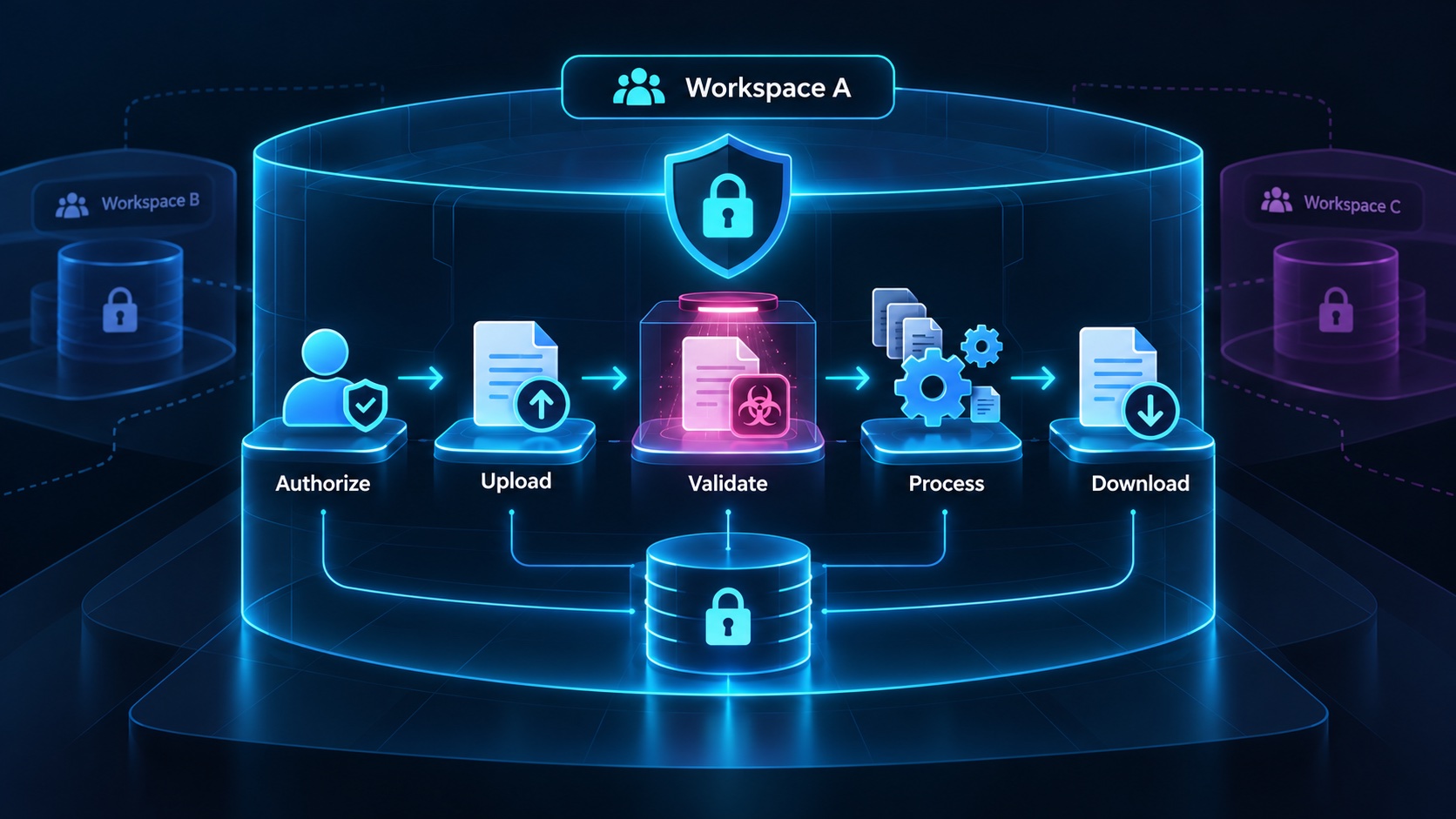
Secure file uploads for a multi-tenant SaaS require a chain of decisions: who may upload, where the file belongs, what content is acceptable, when it becomes usable and who may retrieve it later. A storage provider accepting bytes completes only one part of that chain.
Design uploads as tenant-owned product records with a lifecycle. This gives the application a place to preserve authorization, validation results, processing state and retention decisions rather than treating every object in a bucket as immediately available customer content.
Authorize before issuing upload access
Consider a hypothetical construction planning portal where contractors upload drawings to a project. Before providing upload access, the application should verify the user's membership, upload permission and the project's ownership.
Validate the intended file category and declared size at admission. A profile image, construction drawing and bulk data import may need different policies. Do not expose one unrestricted upload flow merely because the storage client can accept any object.
Create an upload record tied to the workspace and project. Give it a server-generated identifier and storage key. Preserve the customer's original filename as display metadata if needed, while avoiding its use as the authoritative storage path.
Check available storage or resource capacity according to the product's policy. If capacity is reserved during upload, failed or abandoned uploads need a defined release path.
Scope presigned URLs carefully
Presigned URLs can let a browser transfer a specific object directly to storage without exposing the server's storage credentials. Amazon S3's presigned URL documentation explains that these links are time-limited bearer access and can be used more than once before expiration.
That means possession of the link matters. Avoid placing it in analytics events, support screenshots or logs that do not need it. Select an expiry suited to the transfer and the sensitivity of the operation.
Bind the URL to the intended object and method. Use unique keys so a repeated upload does not overwrite another customer's file or an unrelated version of the same drawing.
For S3-compatible services, confirm the provider's supported constraints and behavior. Compatibility with an API pattern does not establish that every policy option works identically across providers.
Validate the completed object
Admission checks use information the client supplies. The application still needs to inspect what actually arrived before marking the asset ready.
The OWASP file upload guidance recommends layered controls such as allowed file types, content checks, safe filenames and limits. Client-provided content type alone is not enough to establish what a file contains.
For the drawing portal, the finished object should match the upload record and satisfy the configured size and file-type policy. Content inspection or malware scanning may be necessary for the formats and processing tools involved.
Keep unvalidated files unavailable through normal customer download paths. A quarantine or pending-validation state helps the interface explain why a successful transfer is still being checked.
Do not allow the client to declare an arbitrary storage key complete. Completion should refer to a server-created upload record whose ownership and expected object are already established.
Preserve the exact bytes you approved. A still-valid upload URL may overwrite its original object after inspection, so a unique initial key alone does not close that gap. Bind approval and downloads to the inspected object version, or copy the inspected bytes to a final key that the upload grant cannot change. Generate previews from that same approved version.
Separate storage from processing
The portal may generate a thumbnail, extract page counts or convert drawings into a preview. These tasks introduce their own failure states after storage succeeds.
Use explicit states such as uploaded, validating, processing, ready and rejected. The customer can then distinguish a network transfer problem from a file that violates policy or a preview operation that needs another attempt.
Run parsers and converters with appropriate resource limits. A small uploaded file can still require substantial processing depending on its contents. Bound processing time, memory and generated output according to the tools involved.
Keep the original and derived assets associated with the same workspace record. A thumbnail or converted preview should not accidentally become public simply because it was created by an internal worker.
Make retries reuse the intended asset version. A duplicate processing request should not produce several indistinguishable files in the customer's project.
Authorize downloads independently
Upload permission does not define every future download. The user's membership may change, a project may be archived or a drawing may be replaced.
When someone requests a download, resolve the file through the authorized workspace and project. Then generate the permitted delivery mechanism, such as a short-lived signed download link.
Avoid treating a difficult-to-guess file identifier as access control. The application should behave correctly even if a person learns another workspace's file ID.
Remember the lifetime of previously issued links. Revoking a membership does not automatically change the application decision already represented by a still-valid bearer URL. Choose expiration and delivery architecture with that behavior in mind.
For highly sensitive downloads requiring immediate revocation, evaluate a delivery path that checks current authorization on access rather than relying solely on previously issued storage links.
Plan cleanup and version behavior
Uploads can be abandoned after an object is created but before the application marks it complete. Jobs can fail after producing a temporary preview. Replacing a drawing can leave older versions in storage.
Define cleanup rules for each state. A scheduled process can identify expired pending uploads and orphaned temporary assets, while preserving files that belong to active customer records.
Coordinate database deletion and storage deletion with a recoverable process. If one fails, the application needs enough information to retry without deleting the wrong object.
Explain version behavior to customers. Replacing a drawing might create a new version while keeping the old version available to authorized reviewers. Deleting the project may follow a separate retention policy. Those choices belong in the product design.
Verify the complete boundary
Test uploads to another workspace, an oversized object, misleading file metadata, an expired URL, duplicate completion and an interrupted processing job. Also test downloading after membership removal and cleanup after an abandoned transfer.
The Agentium Start feature list can help you map the reusable upload foundation to your requirements. Complete the validation, authorization and recovery policies for your file types before treating stored objects as ready customer assets.
Authority References & Sources: